 Short
press:
Short
press:[OK]: Menu, confirm
[Red]: Back/Exit
[ABC]: Change area
[V/M]: Switch VFO/Memory
*: Revert RX/TX freq.
#: Send DTMF sequence
PF2: FM-Radio (# = scan)
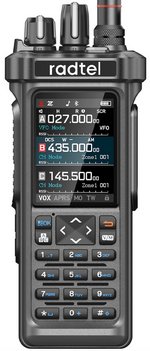
The handheld radio Radtel RT-950 is a little bit bigger than other modern handheld transceivers, and also its weight (386 g) is a bit higher, but nevertheless, it is still easily portable. The size of the case brings one unexpected advantage: For a typical antenna rod, the case works as a counterpoise, and a larger one works much more efficient than a tiny box.
The device sells for slightly less that 100 EUR or 85 US$, and you definitively get a lot of transceiver for the money, including a GPS receiver and an APRS modem.
Unfortunately the user manual does not keep pace with the firmware development, and so many functions are not described in it correctly. For example, the radios differ very much in the assignment of user keys. The following list is what they do on my radio (firmware 0.29) but that may differ significantly from others:
Short
press:
[OK]: Menu, confirm
[Red]: Back/Exit
[ABC]: Change area
[V/M]: Switch VFO/Memory
*: Revert RX/TX freq.
#: Send DTMF sequence
PF2: FM-Radio (# = scan)
Loooong press:
1: Transmit power 1/5/10 W
2: Vox
3: GPS on/off
4: Spectrum display
5: NOAD WX (USA)
6: CTS/DCS Scan
7: SQL level
8: Step
9: Transmit power
0: GPS on/off
*: Scan
#: Lock
<, >: Switch zones
[OK]: Spectrum display
[ABC]: CTS/DCS scan
[V/M]: Show GPS data
PF2: Monitor (open squelch)
Keys during spectrum display:
#: Changes the bandwidth (frequency span)
<, >: Changes center frequency down/up
*: Changes the mode (AM/FM)
Up/Down, turning knob: Changes the threshold (green horizontal line)
More info
Send 1750 Hz tone: Hold PTT while pressing PF2 (bottom key on left side)
TW = Triple Watch A, B, C: Use option "Standby set" in menu "Radio set"
Wake up display backlight: Use < or > which have the least side effects
Saving frequencies can (and should) be done in so-called zones, e.g. zone 1 = amateur radio, 2 = aeronautical, 3 = PMR and so on. Long-pressing the asterisk key then allows to scan through the memory channels of the selected zone.
Sort of hidden is the function to receive long wave, medium wave and short wave. First launch the FM radio (pressing PDF2 briefly). Switch to VFO if necessary. Now go into the menu [OK] and change the modulation to AM, LSB or USB. Only then a LW, MW oder SW frequency can be entered. Use leading and trailing zeroes if needed, e.g. 07200 for 7.2 MHz. Using * (asterisk) you can, among other things, change the BFO offset to have the right pitch in SSB.
The radio has many interesting functions. Tthe accompanying documentation is so poor, however, that it costs many experimenting hours to find out all of them. Anyway, the speaker and microphone audio is great, and the receiver sensitivity is excellent. Using the firmware update function worked flawlessly on a Windows PC with USB port, and in fact versions 0.28 and 0.29 fixed a bunch of bugs.